Why Mirror Sites Provide Different Files While Using the Same Project Name
Understanding Why Mirror Sites Serve Different Files Under the Same Project Name When you search for a software project and find several mirror sites listing the same name, you might expect identical files. In practice,
seo-chicks, Editorial team/
Official mirrors are intended to distribute identical copies of the same release, but differences can appear while servers synchronize or when download pages point to different releases or platforms. Network latency changes download speed, not file contents. A checksum mismatch should therefore be investigated before the file is opened.
4 Reasons Why Mirror Sites Serve Different Files Under the Same Project Name
Even when pages display the same project name, four situations can produce different downloads:
Replication Lag or an Incomplete Sync: Mirrors normally update on a schedule or after an upstream notification rather than sharing live storage with the origin. Debian requires listed mirrors to update at least four times per day, while Ubuntu recommends regular, multi-stage synchronization. During an update, one server may still contain an older file or temporarily inconsistent repository metadata.
A Mutable Filename or Republished Artifact: Projects sometimes reuse names such as latest.zip or installer.exe. If the origin replaces that object, mirrors synchronized at different times can serve different bytes. An archive may also be regenerated to correct packaging or metadata. Kernel.org has documented an instance in which archives were regenerated after tar-header changes caused signature-verification failures.
Different Release Channels or Platforms: One project page may offer stable, testing, nightly, source, or architecture-specific files. A partial mirror may intentionally carry only selected branches or architectures. These are separate artifacts, not inconsistent copies, and should be distinguished by paths, filenames, or manifests. Ubuntu, for example, distinguishes package archive mirrors from release-image mirrors.
An Unofficial Clone or Modified Package: A site can copy a project’s name and design without belonging to its mirror network. HTTPS protects the connection to a domain but does not prove that the project authorized that domain. CISA notes that attackers may obtain valid certificates for malicious websites, so the padlock alone is not proof of legitimacy.
What Is a Mirror Site and How Does It Work?
Definition: A mirror is a server that reproduces all or part of an upstream repository or download tree so users can obtain published content from another location. It is not necessarily a complete copy of the project’s website.
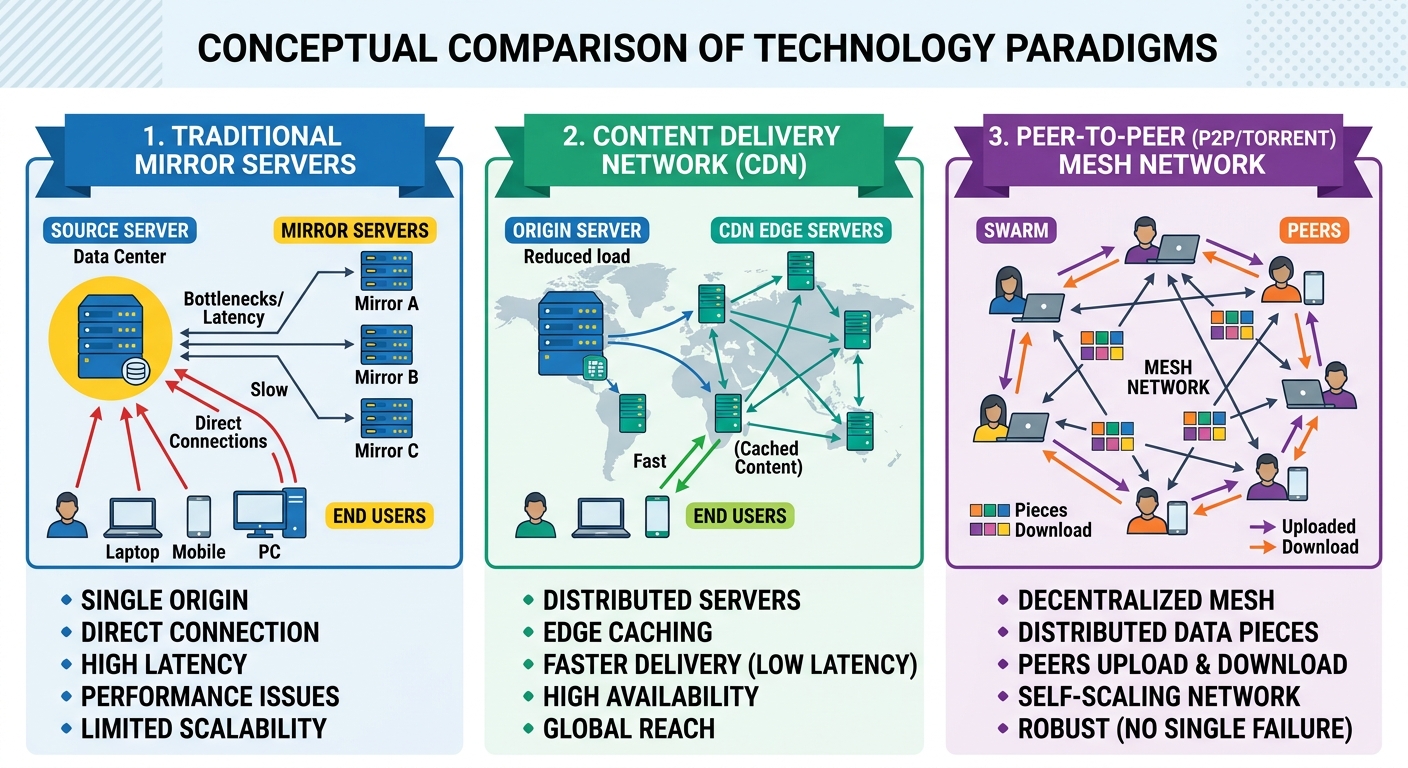
Traffic Load Balancing Mechanism: Mirrors reduce pressure on the origin and may improve speed by serving users from additional locations. Selection can be manual, based on a country list, handled by a redirector, or supplied through repository metadata. Debian uses an upstream-and-downstream hierarchy, so not every mirror synchronizes directly from the main archive.
How Does a Mirror Site Differ From a Backup System?
Users frequently confuse mirror sites with backup systems. The practical differences are:
CriteriaMirror SiteBackup SystemPrimary ObjectiveDistribute a current repository or download collection from additional locations.Preserve recoverable copies for restoration after deletion, corruption, or failure.AccessibilityMay be public or private, depending on its purpose.Normally restricted, although access design varies.Sync FrequencyChosen to keep the copy reasonably close to the upstream state.Created according to a recovery and retention policy.Data StateUsually follows the current upstream tree and may propagate changes or deletions.Preserves selected historical states so earlier data can be restored.
A mirror improves distribution and availability, but it is not automatically a backup. If corrupted or deleted upstream content is synchronized, mirrors may reproduce the problem. A backup is designed around recovery points and retention. AWS, for example, treats live replication, versioning, and policy-based backups as separate data-protection mechanisms.
How Developers Handle Identically Named Files Within the Same Project
Reliable projects do not use the visible project name as the only identifier. They separate artifacts through versions, directory paths, architecture labels, package metadata, checksums, and signatures.
In Document Management Systems
Document systems may allow objects to share a display name because each has an internal identifier and version history. This shows why a filename alone is weak evidence, but Documentum-specific identifiers do not explain public mirror differences.
For software downloads, compare the full path, version, target platform, and authenticated digest.
In Hardware and Electrical Circuit Design
VHDL entities and libraries are development concepts, not a normal cause of mirror mismatch. Similar simulation and synthesis filenames may exist in separate directories, but official mirrors serving the same path and release should converge on identical bytes.
How to Identify an Official and Secure Mirror Site
To reduce the risk of downloading from an imitation site, verify these three indicators:
Valid HTTPS Connection and Correct Domain: HTTPS protects data in transit, but deceptive domains can also obtain certificates. Read the full hostname and do not treat the padlock as proof of ownership.
Official Mirror Listing: Prefer mirrors linked by the project’s main website, package manager, release page, or maintained directory. Ubuntu, for example, publishes information about its registered archive and image mirrors.
Authenticated Release Metadata: Look for SHA-256 or stronger checksums accompanied by a valid digital signature when available. Linux kernel releases provide PGP signatures, while Ubuntu explains how to verify a signed SHA-256 checksum file before checking an image.
A clean interface is not a trust mechanism. A malicious page can look professional, while a legitimate university mirror may show only a plain directory listing.
Step-by-Step Hash Checksum Verification Process for Mirror Downloads
Matching file sizes do not establish integrity. A checksum comparison shows whether the downloaded bytes match a reference value, but only if that reference came from a trusted source. A match does not prove that the software is harmless.
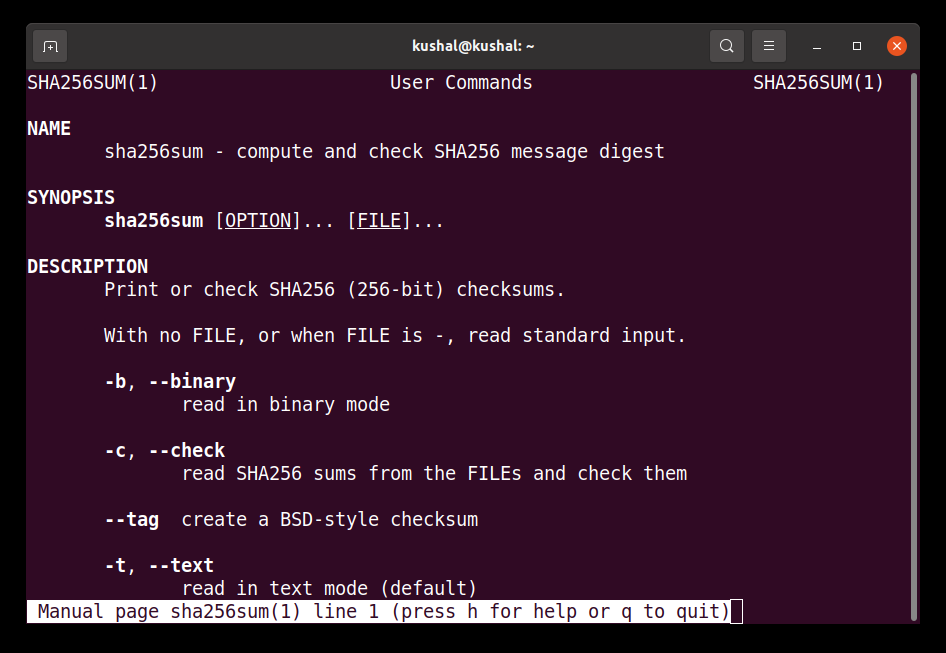
Step 1: Retrieve the Official Hash Value: Obtain the SHA-256 checksum for the exact version, architecture, and filename from the project’s known release page. If a signed checksum file is available, verify its signature with a public key obtained from a trusted project source. Do not rely on an unsigned checksum copied from the same unverified mirror.
Prefer SHA-256 or a stronger supported algorithm rather than MD5 or SHA-1 for new security checks. NIST recommends SHA-2 algorithms such as SHA-256 for applications requiring secure hash functions and is transitioning away from SHA-1.
PowerShell uses SHA-256 as the default algorithm for Get-FileHash, although naming it explicitly makes the command clearer.
On Linux (Terminal):
sha256sum /path/to/downloaded_file.iso
On macOS (Terminal):
shasum -a 256 /path/to/downloaded_file.iso
The shasum command uses SHA-1 by default, so -a 256 is needed to calculate SHA-256.
Step 3: Compare Results: Confirm that the filename and every hexadecimal character match.
100% Match: The file contains the same bytes represented by the trusted checksum. It can still contain defects, vulnerabilities, or unwanted behavior already present in the publisher’s original artifact. A checksum verifies byte-level integrity relative to the reference; a valid digital signature additionally helps authenticate who published the reference.
Any Mismatch: The download may be incomplete, corrupted, from another release, out of sync, regenerated, or modified. Do not execute it. Confirm the version, download it again from an official source, and report a persistent mismatch to the project or mirror operator.
Data Security Risks When Downloading Files From Unprotected Rogue Mirrors
Modified executables, disk images, scripts, and packages can run commands with the user’s privileges. Risk increases when an unverified file is opened with administrator or root access.
Infection by Spyware & Trojans: An unofficial installer may contain additional software that was not included by the original project. A familiar project name or identical visual design does not establish that the binary came from the genuine publisher.
Resource Exploitation and Bandwidth Hijacking: A hostile program may consume processing power, alter settings, or communicate with external systems. Antivirus may detect known threats, but it cannot authenticate the publisher or guarantee safety.
Security Recommendation: Download through the project’s official page or package manager, verify signatures or trusted checksums before opening the file, keep the operating system and security tools updated, and avoid elevated privileges unless required. A firewall does not validate file integrity.
Modern Technologies Replacing and Optimizing Traditional Mirror Systems
Traditional mirrors still operate, but projects increasingly combine them with other delivery methods:
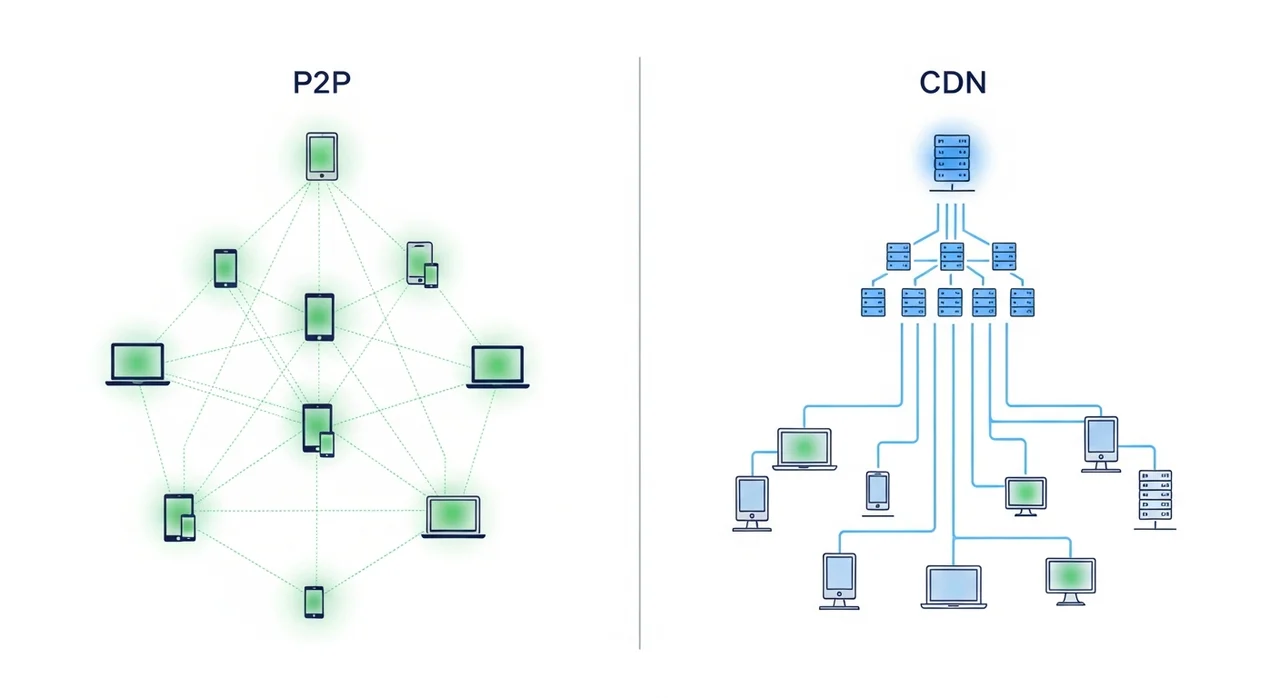
Content Delivery Networks (CDN): A CDN caches content on geographically distributed edge servers, reducing latency and origin load. It often allows users to keep one download URL, although cache freshness and origin configuration still require management.
Hyperscale Cloud Storage: Object storage can handle high request rates and large collections, but projects still need versioning, access controls, integrity metadata, and resilient design. Amazon S3, for example, automatically scales to high request rates while documenting that temporary throttling can still occur as access patterns scale.
Peer-to-Peer Networks (P2P / Torrent): BitTorrent spreads file pieces among downloaders and reduces load on project servers. Debian provides official torrents for installation images. P2P does not authenticate a file by itself, so obtain torrent information from the official project and verify the completed image when checksums or signatures are available.
Discrepancies between files carrying the same project name should not be accepted as ordinary geographic variation. Official mirrors of the same exact artifact are expected to converge on identical bytes. Differences usually point to synchronization timing, ambiguous labels, different repository scope, republished artifacts, or an unofficial source.
Core Actionable Takeaway: Identify the exact release and platform, use a mirror listed by the project, and compare the download with authenticated SHA-256 metadata or a valid digital signature before installing it.